
Quick Wins
Large-scale change rarely succeeds on strategy alone. Even the most well-designed transformation can lose momentum if people don’t see progress. When weeks pass without anything tangible to point to, the effort begins to feel abstract, endless, or disconnected from daily reality.
That is where Quick Wins come in.
Quick Wins are small, carefully selected improvements delivered early in a change initiative that produce visible, meaningful results with minimal effort or resources. They are not the destination. They are the proof of concept - the evidence that the change is real, working, and worth investing in.
This article covers the full Quick Wins lifecycle: what they are and why they matter, how to find and evaluate them, how to use the X4MIS Quick Wins Register to manage them, and how to deliver, verify, and report on them in a way that builds genuine programme momentum.
What Are Quick Wins and Why Do They Matter?
A Quick Win is a small, easily achievable improvement delivered early in a change initiative that produces visible benefits with minimal effort or resources. The key word is early. Quick Wins are specifically designed to be achievable before the broader transformation is complete - often within the first few weeks or months of a programme.
They are not shortcuts or workarounds. A well-chosen Quick Win is a deliberate, planned early deliverable aligned with the change’s broader goals. Think of it as the first chapter of a longer story: it does not resolve the plot, but it gives the audience a reason to keep reading.
The key distinction: A Quick Win that undermines quality, creates technical debt, or confuses stakeholders about the change’s direction is not a win at all. Genuine Quick Wins are planned deliberately - not stumbled upon.
What Quick Wins Achieve
A single well-chosen Quick Win can simultaneously:
- Reassure a sceptical sponsor that the programme is delivering value
- Energise a resistant team by showing the change is real and manageable
- Create a reference point that communicates the change more powerfully than any presentation
- Build trust in the change team by demonstrating they can deliver small things - and therefore large ones
- Protect momentum during the long middle stretch of a transformation, when energy naturally dips
What Happens Without Quick Wins
Change practitioners who focus exclusively on the long-term transformation and neglect early visible progress consistently encounter the same set of problems:
- Momentum stalls as stakeholders disengage from a programme with nothing to point to
- Resistance grows as sceptics’ doubts gain credibility without counter-evidence
- Sponsor confidence erodes as senior leaders question the investment
- Change fatigue sets in as teams prepare endlessly for a change that never seems to arrive
- Trust in the change team diminishes - if they cannot deliver small things, can they deliver large ones?
Quick Wins are, in part, a risk management strategy. They are the change team’s way of demonstrating competence, building trust, and keeping the programme visible and valued.
Finding and Evaluating Quick Win Candidates
Quick Wins do not usually announce themselves. They require the change team to look deliberately across the organisation, into existing data, and into the lived experience of the people most affected by the change.
The most productive sources of Quick Win candidates are:
- Stakeholder interviews and feedback sessions
- The Change Impact Assessment (especially groups rated as High Impact)
- Pain points surfaced through the Blast Radius analysis
- Process bottlenecks identified by frontline teams and
- Existing improvement ideas that have stalled due to lack of priority or sponsorship.
Tool 1: The Effect vs Impact Matrix
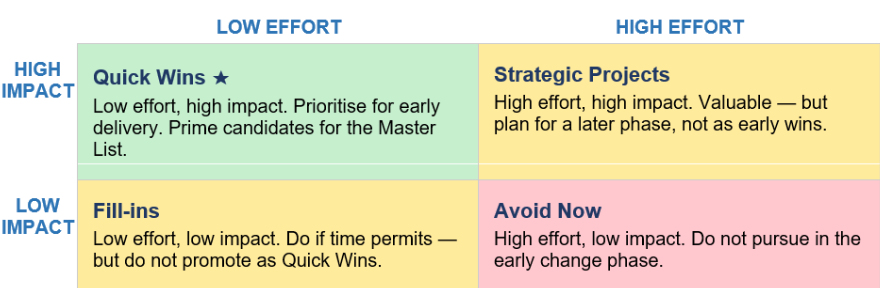
Once you have gathered a list of potential candidates, the first step is to sort them quickly and objectively. The Effort vs Impact Matrix classifies each candidate across two dimensions: how much effort it requires, and how much impact it will deliver.
It is a sorting tool, not a scoring tool. Its purpose is to identify which candidates belong in the Quick Win quadrant:
Tool 2: The Quick Win Evaluation Checklists
The Evaluation Checklist tells you whether each Low Effort / High Impact candidate is genuinely ready to be progressed. Apply it to every candidate that passes the matrix before entering it in the register.
The seven criteria are:
- Visibility - will stakeholders see this result?
- Alignment - does it support the change’s direction?
- Credibility - would a sceptic be convinced?
- Achievability - can it realistically be delivered early?
- Speed - can it be delivered within the required timeframe?
- Ownership - is there a named individual who can own it?
- Measurability - can we prove it worked?
The Credibility Test: Before selecting any Quick Win, ask: would a sceptic be convinced by this result? If the improvement is trivial, cosmetic, or only meaningful to a small group, it is unlikely to move the needle on confidence or resistance. Choose wins that even the doubters have to acknowledge.
Connecting Candidates to your Stakeholder Intelligence
Quick Win identification should never happen in isolation from your Stakeholder Analysis. The groups identified as most resistant, most impacted, or most influential in your stakeholder map are precisely the groups where a well-chosen Quick Win will have the greatest strategic effect.
The key principle: Quick Wins should not be selected based on what is easiest for the change team. They should be selected based on where early visible progress will have the greatest strategic effect on adoption, resistance, and momentum.
The X4MIS Quick Wins Register
The X4MIS Quick Wins Register is a six-worksheet Excel file that covers the full lifecycle of a Quick Win - from initial identification through to verified delivery and sponsor reporting. Data entered in one worksheet flows automatically into the others, so there is no duplication of effort.
The six worksheets cover three distinct phases:

Worksheet 1: Master List
The central register. Every Quick Win candidate - once it has passed the Effort vs Impact Matrix and Evaluation Checklist filters - enters the process here. The Master List acts as the single source of truth for the entire Quick Win programme from first entry through to completion or withdrawal.
Description quality matters enormously. A clear, specific description - for example, ‘Automate the weekly inventory report for the warehouse team, saving four hours of manual compilation per week’ - flows into every other worksheet and makes evaluation far more rigorous throughout the process.
Worksheet 2: Decision Tool
The Decision Tool validates each Master List candidate before formal scoring begins. It opens with two gateway questions: Is this important? Is this significant? A candidate that fails both should be returned to the Master List as On-Hold or Withdrawn.
Candidates that pass are then assessed against the programme’s Decision Categories - by default the SMART framework:
- Specific
- Measurable
- Achievable
- Relevant
- Time-bound.
Each question is scored Yes (10), Maybe (5), or No (0), producing a Category Total.
The Category Total serves two purposes: it acts as a gateway signal to the Change Team before steering committee involvement, and provides context for the Review Panel when they score candidates in the Decision Matrix. Importantly, it does not flow directly into the Priority Rank - it informs but does not replace the panel’s independent judgement.
Worksheet 3: Decision Matrix
The Decision Matrix is where validated candidates are scored, weighted, and ranked by the Review Panel - facilitated by the Change Manager but decided by the panel.
Before scoring begins, the Sponsor or Steering Committee agrees a Programme Weighting (1–10) for each Decision Category, reflecting how important that criterion is to this specific programme. A programme under time pressure might weight Time-bound at 10; a cultural change programme might weight Strategic Alignment highest. These weightings are set once and do not change across the programme lifecycle.
Each candidate is then scored 1–10 against each category by the panel. The template calculates the Total Weight Score and Priority Rank automatically. Candidates are colour-coded red (low) through green (high).
The Priority Rank informs - it does not decide. The panel retains full discretion. When a panel’s recommendation differs from what the ranking suggests, the rationale must be documented in the Master List Notes column.
Setting Up the Register - Three Governance Decisions
Before the register is used for the first time, three governance decisions must be made. Using the register before they are in place will produce unreliable results and undermine the credibility of any recommendation presented to the Steering Committee.
- Define the Decision Categories (Steering Committee): Select the categories against which all candidates will be assessed. The default categories are the SMART framework, but they can be customised to suit your programme’s priorities.
- Set the Programme Weightings (Steering Committee): Assign a weighting of 1–10 to each category. Once set, these do not change. Changing them mid-programme would make it impossible to compare early and later candidates on a like-for-like basis.
- Set the Decision Category Questions (Change Team, approved by Sponsor): Draft the specific questions that will be used to assess each category. This is a working session, not a governance meeting. The Change Team does the detailed work and brings finalised questions to the Sponsor for sign-off.
Practical tip: Never present the Steering Committee with a blank template and ask them to design the categories from scratch. Come prepared with a draft set of categories and questions, explain the rationale, and invite them to challenge or adjust. This produces far better decisions than starting from nothing.
Delivering the Quick Wins
Once a Quick Win is approved, it moves into the delivery phase. The first and most important thing to understand is that the person named as Owner in the Implementation Tracker is accountable for the Quick Win being delivered - but is not necessarily the person who does the hands-on work.
Five Delivery Types and Who Owns Them
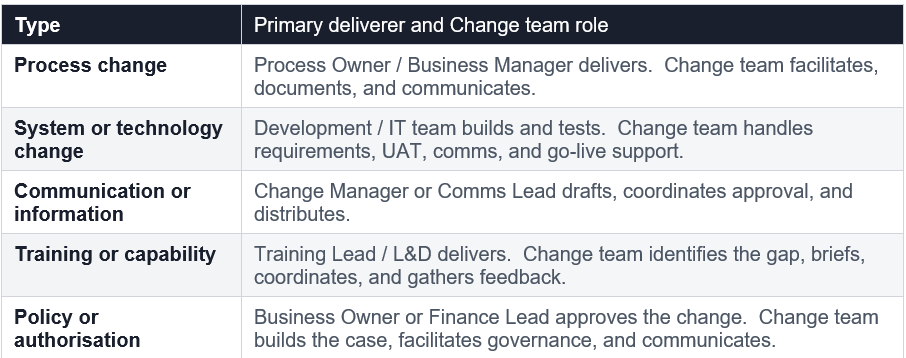
The Change team never fully steps back. Even when delivery is handed to another team, the Change team retains responsibility for maintaining the Implementation Tracker, managing stakeholder engagement, coordinating UAT and pilot groups, escalating blockers, completing the Benefits Log, and planning communications. The handover of delivery work means shifting from doing the technical work to enabling, supporting, and tracking it.
RAG Status - What Each Level Demands
RAG status in the Implementation Tracker is not a reporting formality. It is a decision-making tool, and each level carries a specific and non-negotiable obligation:
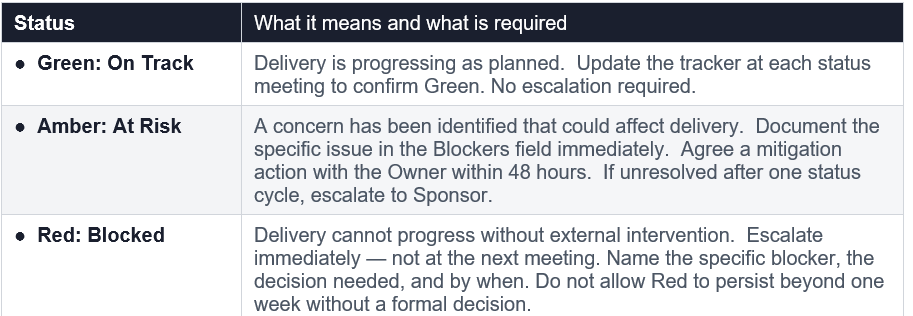
The Amber Trap: The most common failure in RAG management is leaving a win on Amber without taking action. Amber is not a holding status - it is a call to act. A win that sits on Amber for two consecutive status meetings without a documented mitigation plan should be escalated regardless of how close to resolution it appears.
The Benefits Log - Delivery Is Not Quite Enough
Delivery and verification are two different things. The Benefits Log is where the change team moves from “we delivered it” to “we can prove it worked.” Every completed Quick Win must have a corresponding Benefits Log entry before it can be considered truly finished.
The Benefits Log serves three purposes:
- Verification: confirming the win delivered what it promised, confirmed by someone outside the change team.
- Evidence building: creating a credible, documented record of outcomes.
- Communication trigger: prompting the team to ensure every completed win is communicated to the right people.
Completed means verified - not just delivered
A Quick Win should only be marked Completed in the Implementation Tracker once two conditions are both met: delivery is fully done, and the outcome has been verified by someone outside the change team and recorded in the Benefits Log.
The verifier must have direct, day-to-day visibility of the area affected by the win. A change team confirming its own results is not credible to a sponsor. A warehouse manager confirming that four hours of weekly manual work have been eliminated is.
Benefit rating (1–5) - be honest
A post-delivery benefit rating summarises how well the Quick Win delivered against expectations. A Benefits Log where every win scores 4 or 5 is not credible - it signals the rating is being used to report positively rather than accurately. A mix of ratings, including occasional 2s and 3s, tells a far more believable story and produces more useful lessons learned.
A rating of 1 or 2 is not a failure. It is valuable information about whether the win was well-targeted, whether delivery encountered issues, or whether the original benefit statement was over-estimated.
Communicating the Win
One of the most common failures in Quick Win delivery is treating communication as an optional extra. A win that is delivered, verified, and rated, but never communicated to stakeholders, does not build programme momentum. It does not shift perceptions. It simply disappears.
The Benefits Log includes a Shared in Comms field (Yes / No / Planned). When it moves to Planned, the change team should have a communication brief ready - answering five questions:
- Who is the audience?
- What is the key message?
- Who is the messenger?
- What is the format?
- What is the timing (ideally within 48 hours of verification)?
The Dashboard - Reporting to the Sponsor
The Dashboard is the reporting and visibility layer of the template. It brings together live data from all five other worksheets into a single, easy-to-read summary designed for the Sponsor and Steering Committee. It requires no explanation and no navigation - everything leadership needs is on one page, auto-populated and always current.
What the Dashboard shows
The Dashboard displays at a glance:
- Total Candidates (from the Master List)
- Approved, On Hold and Rejected (from the Decision Matrix),
- Completed (from the Implementation Tracker), and
- Benefits Verified (from the Benefits Log)
Watch the Completed vs Benefits Verified gap. A sponsor who sees ten Completed but only three Benefits Verified knows immediately that seven wins have been delivered but not yet verified. That is a direct action item for the Change Manager before the next steering committee meeting.
The main body of the Dashboard displays the top ten candidates ranked by Total Weight Score from the Decision Matrix, with their current RAG status, all colour-coded automatically.
The Dashboard is Read-Only
The Dashboard is the only worksheet in the template that should never be manually edited. Every number, status, and ranking populates automatically from the other worksheets. If something looks wrong on the Dashboard, the fix is always made in the source worksheet - never in the Dashboard itself.
An incomplete Dashboard presented to a Sponsor without explanation undermines confidence in the programme. If any source worksheet has incomplete data, update it before the steering committee meeting. Do not note the gap verbally and move on.
Summary
Quick Wins are one of the most underused and most powerful tools available to a change practitioner. Used well, they protect programme momentum, build trust with stakeholders, demonstrate the change team’s competence, and give the sponsor a story to tell.
The X4MIS approach to Quick Wins is structured and deliberate. It begins with rigorous candidate identification and filtering, moves through governance-backed evaluation and prioritisation, and ends with verified delivery and transparent reporting. Every step is managed through the X4MIS Quick Wins Register - a single, integrated tool that makes the entire process visible, credible, and sponsor-ready.
Done properly, a Quick Win is not just a small improvement. It is a strategic signal to the entire organisation that the change is real, that the change team is capable, and that the transformation is worth believing in.
For detailed information about Quick Wins and the using Quick Wins Register, see our X4MIS Change Management Practitioner Program.
Download the Quick Wins Register template
